Showing posts with label GPS. Show all posts

Tuesday, March 31, 2015

The AOPA Is On Board! (finally)

The FAA wants to move forward. On October 1, the FAA wants to move forward with the flight plan form change for everyone. The airlines have mostly moved forward to use only the ICAO format since about 2008, for all flights.


Today the AOPA agreed that maybe it is time to retire that old friend 7233-1. Yes, that is the old flight plan form that we all grew up with (unless you are in another country, or went straight to a major Airline from a good flight school). You may even send AOPA your comments: airtrafficservices@aopa.org

The Association has a quick video about the changes.

http://www.aopa.org/News-and-Video/All-News/2015/March/26/Changes-to-Flight-Services-planned


It is no secret that I have been trying to get rid of the 7233 form. The ICAO for, looks intimidating, but is really simple once you look at it. Everything before the "FPL" is not needed and everything after field 18 is optional. The stuff translates pretty well, starting in field 7, aircraft ID is either the N number or the flight number that the ATC will know the aircraft as. Field 8 is the flight rules and type, IFR or VFR, just put an "I" or a "V" in the box, the type is GA (G), Military (M), Scheduled (S), Non-scheduled (N) and Other (X). Field 9 is the number, type and wake turbulence class, put more than 1 if this plan is for a group of aircraft, the type is C172, A36, or whatever your aircraft type is per ICAO 8643, and the wake turbulence is Heavy, Medium or Light depending on aircraft weight.

Field 10 is the big winner in this form. What does a /U represent on the old 7233-1 form? Well field 10 there is no guessing. The equipment you want to use on this flight can be specified here, in all it's glory. Got a VHF comm radio, put a V there. Have a VOR Nav radio, put in a O (vOr), how ab out GPS, put in a G.  If your aircraft has CPDLC use a J with some numbers depending on your type to put here, Mostly, the letters for the common stuff are:


  • A - GPS Landing system
  • F - ADF
  • G - GPS (or other global navigation system)
  • H - HF radio 
  • I - Inertial Navigation
  • L - ILS
  • O - VOR
  • P - Performance Based Navigation (can include various RNAV equipment see FAA Doc 9613)
  • V - VHF radio (12kHz spacing)
  • W - RVSM

Field 10 also includes the type of transponder the aircraft will use. The common values are:

A - Mode A only (squawk code only)
C - Mode A/C (altitude encoding)
E - Mode S with extended squitter (ADS-B)
S - Mode S with altitude and aircraft ID
N - No transponder

There is no field 11, 12 or 14, so there is even less to fill out!

Field 13 is where the flight originated from, all four letters/numbers ICAO format (IE KORD) and time in UTC.
Field 15  Cruise Speed, Level and Route. This is probably the most flexible part, especially the route.
The cruise speed is the cruise speed the aircraft will initially be flying at once at cruise altitude. The Level is the altitude the aircraft will fly at, preceded by the type of information. For flight levels, use an F and the flight level (IE for flight level 180, put F180), or for hundreds of feet use an A followed by the feet (IE for 8500 feet, use A085). The route will be all the waypoints between the departure airport and the destination airport. These waypoints can be specific named waypoints (IE MINEE), lat/lon coordinates (IE 46 degrees 20 minutes N 78 degrees 5 minutes west would be specified as 4620N07805W), or fix radial distance (FRD) coordinates (IE 30 miles south of the Kankakee IL VOR would be specified IKK18030).

Field 16 is the destination, the Estimated Enroute Time (not the arrival time) and the first and second alternates if needed. If it will take 2.5 hours to get to Oshkosh, field 16 will be KOSH0230, if you need to use Milwaukee for an alternate, then the field 16 is KOSH0230 KMKE.

There is no field 17 either, so there is even less to fill out.

Field 18 is labeled "Other Information" which seems casual, but it is really formatted other information. I hinted that if in field 10 the aircraft is RNAV capable a note can be added to field 18 to tell the ATC what kind of approach you may want, as in: NAV/RNVD2 to use a GPS receiver to do a 1 mile approach. (RNP will take specific pilot training). If you just want a note to be put on the flight plan, the RMK/ can be used followed by the text of the message. Other specific field 18 values are:


  • HAZMAT: For a flight carrying hazardous material;
  • HOSP: For a medical flight declared by medical authorities
  • MEDEVAC: For a life critical medical emergency evacuation
  • SAR: For a flight engaged in a search and rescue mission

The one place that gets ugly is the ADS-B specifications. If the aircraft ADS-B installation is DO-260B then the field 18 must contain SUR/260B or if the ADS-B installation is DO-282B compliant then SUR/282B should be specified in field 18, (DO-260B is the specification for a Mode S transponder with Extended Squitter or 1090ES, DO-282B is the specification for UAT radios). I hope that clears that mess up.

An example field 18 can look something like:

   SAR NAV/RNVD2 SUR/282B RMK/Aint we got fun

That would be a search and rescue flight with GPS capable of RNAV 1, using ADS/B UAT radio, telling the controller we might be having fun.

Are we ready for fall? That is when this all will be happening.

Sunday, January 4, 2015

Gate to Gate

Over the last couple years, I have written about many bits of technology that aircraft use. I really haven't discussed too much what bits are used when, and for what. This post, I will try and tie all the items and their use into a comprehensive post. I'll use a commercial airliner (Part 121) for the discussion, both because they typically use more technology, and because that is what my background is. I will also base most of this on flights in the US, to keep it simpler.

We can start a few hours before the flight actually leaves. As the flight approaches it's scheduled time to leave, a group of folks have started planning for the flight. Sure, there is network planning, they set up the schedules and try to be sure the flight will make money, and provide continuity, and such, but that is usually done months in advance. There are also the simulators that the pilots use for proficiency checks, and training, but that is on going and not related to a particular flight, but important none the less.

Dispatchers and meteorologists are considering the situation between the origin and the destination of the flight. The meteorologists are generalists, looking at the weather over the country, where dispatchers are more concerned with the weather along the route between the cities. The dispatcher needs to consider the situation at the specific airports, for runway closures, and other challenges unrelated to weather. There is a tool called Collaborative Decision Making (CDM), where the dispatchers work with the other airlines so everyone can utilize the airports and airspace as optimally as possible.

The dispatchers can use CDM to look for areas to avoid when selecting a route between the two cities. If there is a bad thunderstorm along the optimum route and all the other airlines are avoiding it to the south, the dispatcher may pick a northern route to stay out of everyone elses way. Once the dispatcher selects a route, they need to build the rest of the flight plan. The dispatcher will build a flight plan using many tools. The dispatcher may allow the flight planning engine to select routes, or the amount of fuel. Depending on aircraft maintenance situation, and MEL deferrals and such the flight planning engine can accurately predict the fuel burn based on weather and route.

Once the dispatchers are happy with route and fuel selected, they will file a flight plan. The flight plan will be filed with the Air Navigation Service Provider (ANSP) for both the origin and the destination. For the US the ANSP is the FAA, in Canada is is NavCanada, and in the UK it is NATS. The ANSP handles all the RADAR and air traffic control (ATC) functions. The flight plan will give the ATC controllers a heads up on what the aircraft was planning on doing once in the air.

As the pilots get to the aircraft, one will typically do a walk around of the outside of the aircraft making sure the aircraft looks safe and no damage is visible. The other pilot will typically go to the cockpit and begin setting things up. There may be a the initialization of the FMS, maybe a RAIM check of the GPS, and entering the flight plan prepared by the dispatcher into the FMS. The dispatcher provided flight plan will usually include weather information for the route, and any other non weather realted information for the route (IE ATC changes, etc), The flight plan will also contain fuel and time information that the pilot can double check, insuring the dispatcher hasn't made any mistakes.

When the pilot know the fuel situation, they may confer with the fueler to adjust any fuel amounts to be put on board. The pilot will also need to know how many bags and passengers are on the flight, so they may make proper weight and balance calculations. Some airlines have a load planner who takes care of the weight and balance, others still let the pilot take care of this. Depending on the aircraft, it may be necessary to have a person dedicated to making the load calculations.

As all the passengers are seated, and the pilot is about to move the aircraft, they will ask for permission to move. There may be a ground controller dedicated to the gate area, and there will need to be taxi clearances and such needed from them. Other airports everything is controlled from the tower, and any movement must be cleared through the tower controllers. An ACARs message may be sent requesting the Pre Departure Clearance (PDC), that will be a version of the flight plan sent to the ATC with any ATCneeded changes to the plan. The PDC will also contain the code the pilot needs to enter into the transponder. The pilot must acknowledge receipt of the message.

After the aircraft is taxied to the runway, the pilot will ask the tower for the final airport clearance, by announcing "ready for takeoff". Once the ATC controller gives the pilot final instructions the pilot can access the runway and start the takeoff. The ATC instructions will be the route the pilot should take to get from the runway to the beginning of the flight plan route. Every bit of the instructions and plans for the takeoff are there in case there is a failure. If there is a radio failure either from ATC or the Aircraft, the instructions given are good enough for the pilot to take off, fly the planned route, and approach the destination. It is a safety situation, should the plan be the safest and most expeditious way to fly the route.

Once the aircraft is above about 300 ft, depending on the  airport, the aircraft will appear on RADAR. The first RADAR that will show the aircraft is the TRACON, who will control the aircraft after tower hands off the aircraft. The TRACON controller will control the aircraft until it is more than 30-50 miles from the airport. The TRACON will hand the aircraft off the enroute controllers who will control the flight until it is 30-60 miles from the destination airport. The RADAR data will be collected and sent to the FAA command center for others to view, and use the ADSI information. As we move into NextGen, there may be more ADS/B position reporting, instead of RADAR.

Once the aircraft is on the route, the pilots will typically engage the autopilot. The autopilot will help maintain the route of flight, altitude and throttle settings to insure the aircraft flies the route planned, and uses the fuel planned. The pilot must monitor the autopilot to be sure it is engaged, and doing the right thing the whole flight. Occasionally pilots will hand fly the aircraft, for practice. Once in a while the autopilot will fail, and the pilots must had fly the aircraft. The systems in the aircraft are designed for certain reliability levels.

During the enroute portion of the flight, there may be messages the pilots need to send to the company operations center. The pilots will usually send a text message over ACARS if they don't have a lot of urgency to the message. The pilots also have an option for voice communication using company assigned frequencies. If there were to be a medical emergency, the voice communications will be used, if a pilot is looking for a weather report for 400 miles ahead, they will use ACARS.

As the aircraft gets closer to the destination, ATC will typically begin having the aircraft start to descend. Newer approaches follow a continuous descent profile, where the pilots set the throttles to idle at altitude, and basically use the potential energy to glide the aircraft to the runway, reducing noise, fuel burn and pollution.

Current approaches typically are designed for the aircraft to provide it's own guidance. That is there are airs on the ground (or satellite) to provide the aircraft the information it needs to know where it is, and fly to the runway. Features like DME and ILS radions are on the ground, and GPS satellites are in the air.

The enroute controller will hand the flight off to the TRACON controller about 50 miles from the airport, where the aircraft will be below about 10,000ft. The TRACON controller will clear the flight for the approach that it will use to get to the airport. At about 5 miles out, the pilot will be told to contact the tower, and the tower and the pilot will make the final checks and be cleared for the runway to land on. Once on the ground, the pilot will talk to the ground controllers to get to the proper parking area, and maybe a gate controller for certain airports. Once the wheels are chocked, and the engines shutdown, the pilots are mostly done with the flight.

Yes, there is a bit of technology going on between each gate, and a little before. Ever think about that before.

Saturday, July 19, 2014

Thoughts On Cockpit Electronics

Recently I was playing an EFB type app. I think I've mentioned it on my other blog, and I am mostly happy with Avare. This app will allow weather downloads, and is a moving map and can display charts of most types (Sectional, WAC, IFR Low and High, etc). It has built in AF/D, can display approach plates, and topographical data.


While using it, I was surprised by a few things, and it occured to me you cannot just buy the latest technology and go out and blindly rely on it. You really need to know how it works, and test it out for a while.

I flew with the Avare app on a Samsung Note 10.1, and found a few anomalies with the system, and I am sure other apps and tablets have similar anomalies. I was testing the app out while riding in the back of a 737, and the GPS was mostly unusable back there. On takeoff it seemed to work well and I could see the acceleration down the runway, and the climbout was displaying nice. But about the first turn, and suddenly the GPS wasn't working at all. No speed, no heading, nothing. Then it was intermittent the rest of the flight.

Avare, like most moving map applications can take another GPS source as the input. There are several manufacturers that offer standalone GPS source devices (IE Garmin). Avare even offers an app you can run on another device (IE phone) to use that GPS source to feed the application. On my next flight, I ran the external app on my phone, and was feeding Avare with the GPS output from my phone. The phone was in my pocket, and I had a window seat, so it worked almost 100% of the flight.

Since the my phone GPS wasn't 100% reliable, it was a good test. I've mentioned Kalman filters in other posts, I wanted to see if this app had any coast mode, where the application would predict the location based on flight plan and last few samples, but it didn't. When the GPS signal was lost, the airplane on the magenta line would point straight north, and stop updating. This by itself was a good thing to know, since GPS isn't 100% reliable in any situation (see the RAIM predication post), and it is good to know what indication is out there when the GPS signal isn't there. When the GPS data was available again, the airplane symbol oriented itself to the flight path the aircraft was following.

Another test I found out about, the hard way, was the chart updating. The charts are generally current for a period of time, some are 28-56 days (IE approach plates) and others up to about 6 months  (IE sectionals). Some of my charts were out of date. The app has a nice feature allowing bulk downloads of charts, but not while out of WiFi range. Most charts are big files, that take a while to download. Even a 737 with WiFi on board isn't the best place to bulk download charts, since most of the flight may have taken place by the time it updates everything (depending on how many plates are out of date). It is best to do the bulk update the day before the trip, to allow time to make sure everything downloads, and the WiFi at the hotel is reliable, the FAA didn't change anything  and everything else works.

Another problem I found, the 10.1 inch tablet might be too big for a cockpit. If I was flying an A380, it might be fine, but even in the seat in the back of the plane, occasionally it got in the way. It would be nice to try an 8 inch tablet next time. The 10.1 inch tablet is about an inch wider than my knee board on all sides. It might be nice to find a knee board adapter for a tablet. Knowing were it is, and what happens when accidentally touched might be a good thing to know. I tapped the screen multiple times on the flight, and sometimes the screen would go off center, I would have to punch the button to set the center again.

Entering a flight plan on the flight was frustrating at best. For the flights I was on, I could look at the route on flightaware.com, and see what waypoints to enter. I was on a flight from DAL to MSP, that stopped in STL. I needed to enter two separate flight plans, which would have worked much better in the terminal rather than in my seat. Then when I got done, I needed to activate the correct one. At first I had forgotten activate the first plan I entered, so the magenta line didn't show up. The Distance Next and Estimated Time Next were updating as if we were flying a single leg flight.

When we began our approach to the middle airport, I thought I could click on the approach plate, and the app would plot the current position on the plate. It didn't, which made sense after I thought about it, since the approach plates aren't always drawn to scale nor have consistent references, and SIDS and STARS never are drawn to scale. The app was smart, since it knew where we were, and punching the "plate" button brought up the correct airport diagram, and I could select the approach, SID or STAR I wanted to use.  A split screen feature might be nice, especially on a STAR.

The weather feature is nice, since it loads most of the standard weather products, (IE METARs, TAFs, PIREPS) for areas along the route. It wouldn't make sense to get a METAR for Chicago if I am going from Dallas to St Louis, and this seems to do a good job. The weather isn't updated if there is no data connection. Some apps will work with a FIS-B receiver, but even those messages may not be as timely as pilots need in a dynamic system. Talking with Flight Service is still the best way in busy weather systems.

I really enjoyed using the app. I can see it being a tool to rely on. I can also see I need to work with it a bit more, and read the manual. Other similar apps are probably just as good, and will need careful integration into any flying procedures. The FAA doesn't allow using handheld GPS devices for primary navigation in IFR conditions, but for VFR, there should be nothing wrong with using this for navigation.

What do you use?


Monday, June 16, 2014

RAIM and GPS


Wow, I can't believe I haven't written this post yet. I have mentioned RAIM in other posts, but I haven't explicitly explained RAIM. RAIM used to mean Redundant Autonomous Integrity Monitoring it was a technology built into many GPS receivers. TSO-C129 required GPS receivers to have RAIM built in. It would monitor the quality of the GPS signal, and if things were bad enough, the RAIM system would alert the pilot that things aren't working.


If you go back to the NextGen post I did a little more than a year ago, I mentioned RAIM, and the FAA's RAIM prediction tool: http://www.raimprediction.net this tool will predict places in the CONUS where the RAIM alert will go off in the future.

The GPS signal is just telling you what the time was when the satellite sent the signal. The satellites also send location information along with the time. The almanac is the location of all the satellites in the constellation. Knowing the time the satellite sent it's signal, and knowing where the satellite was when the signal was sent, the GPS receivers are able to triangulate (sphere-iate?) their location.

The satellite time message is sent every few minutes, and is susceptible to all kinds of problems. The message may bounce off buildings, mountains or other vehicles causing a wrong distance to be calculated. Other times the satellites will be down for maintenance, and testing, so it won't be available for measurements. Knowing the current status of the constellation is critical to make a valid prediction. Knowing local terrain will help make predictions more accurate.

With GPS Helpers, RAIM prediction is not needed. Using satellite or ground based augmentation systems (IE WAAS, LAAS) the number of satellites isn't as critical. Knowing the WAAS system health is required, and the FAA will issue NOTAMs if the WAAS system isn't up to snuff.

As you can see RAIM has its use, and can make older GPSs more usable.

Saturday, February 15, 2014

How To Design an Autopilot

An autopilot is a very complex bit of machinery. Ever think about all the stuff it needs to know and how it does it so well? As a pilot, you were taught that you start a turn before you get to a waypoint, so you don't overshoot. As a computer, how do you know to start a turn before, and how much before?

The FAA has an amazing document, AC 8260.58. I recommend getting the whole PDF, and opening it in a true Adobe reader because this document is interactive, and it is large. This document is full of very well explained math. There are tons of definitions and discussions in here, PLUS there are sample calculators right in the document.Depending on the age of your Adobe reader, you might get some weird document navigation indications.

The document is really about how PBN procedures are designed. PBN procedures assume the aircraft will have an autopilot, so it is interesting to see how the procedures are designed for the limitations of the autopilot.

The drawings in the document are amazing. Look in volume 5 page 9 figures 2-4A and 2-4B, to see how turn errors can be calculated using the radius of the required navigation performance, and bisector lines, and the arc that intersects the edges. The page before (page 4) explains step by step how to make the calculation.

The document is full of acronyms, but they are all explained in volume1 chapter 3. Not all the acronyms are what you might think or are used to in other contexts. In this document CG is "Climb Gradient" not "center of gravity", ATT is "Along Track Tolerance" not that big phone company, etc. It is best to have that chapter book marked to allow you to check back.

The book outlines other tolerances as well. Some of the measurements are metric, while others are nautical miles, and the conversions are part of the calculators in the document. Many of the intermediate values need to be kept in 15 significant digits, and stored in 64bits, with no rounding of intermediate results. There are other common standards that this document relies on, including GPS units calculate the diameter and shape of the earth based on WGS-84 standard.

Much of what is in the document is code that could be copied right into some programs. What code isn't there, is mostly easy to figure out, and could be part of a separate function or method. 

There is a good review of many basic algorithms, including intersections of two arcs, locating a point relative to a locus, and calculating arc length, or sub-arc lengths. 8260.58 might be a good workbook for some advanced STEM type program.

With this reference, building an autopilot should be less searching, and easy implementing.


Sunday, December 1, 2013

FMS FMC and how airplanes know where to go.

Flight Management, how does the airplane know where it is, and where it ought to go. The pilot may want to be in charge, but his job is to manage the systems. There are many systems in an aircraft, and many come together in a single computer called the Flight Management Computer (or Flight Management System). The pilot can use the FMS/FMC on the airplane to help manage these systems.

The heart of the navigation system are the gyroscopes and accelerometers. The gyros are known as the Inertial Reference System (IRS). The IRS will be used to measure changes in flight orientation. The IRS will output heading, attitude and change being imparted. Gyroscopes will measure current conditions, accelerometers will measure the change being imparted on the current conditions.

Gyroscopes are great tools for use in aircraft. The horizon gyroscope will hold true through many oscillations of the aircraft, climbs, turns and dives it will usually show the blue side up. The bank gyro will also handle climbs, turns and dives. The directional gyro will maintain heading for hours.


Accelerometers will measure the forces acting on the aircraft in the various directions. As you were taught in instrument training, or perhaps in private pilot ground school, the seat of your pants isn't accurate at measuring change in coordinated flight. Accelerometers are like the seat of your pants, measuring g forces in three directions (forward/rearward, left/right bank and pitch). They will inform the pilot, or flight management system if the aircraft isn't in coordinated flight, or the increase or decrease of thrust is having and effect.

Integrating the accelerometers and the gyros is how the aircraft can measure where it is relative to where it started. When the aircraft is initialized by the pilot, the current latitude and longitude are entered or received from the GPS system. As the aircraft changes position, the accelerometers will measure the forces acting on the aircraft from the TUG as it pushes the aircraft back from the gate. When the aircraft is in flight, turns can be measured by combining the angle of  bank, and the "vertical" acceleration to measure the horizontal component of lift (HCL), and compare it to centripetal force, to measure the rate of a turn.

A couple posts ago, I was going to talk about Kalman filters. This is where the Kalman filter pays dividends. The Kalman filter will take data that isn't perfect, and make some sense out of it. Sometimes gyros or accelerometers will measure unreasonable values, some large, some small. The Kalman filter will make a best effort to use that information in a way that is reasonable (it may throw the data away, or it may smooth it, such that it looks like a normal reading).

The gyros precess. Since bearings and motors are not perfect, the gyro won't always hold the proper heading for the entire trip. A certified IRS should be accurate to about 650 meters in 1 hour. That means that the aircraft know where it is in the world with a 650meter sphere around it. Most modern aircraft will update the FMS with GPS information, allowing the IRS and the GPS to argue about who is more accurate.

The IRS will output all this information, and the FMS will work together to let the pilot know where the aircraft thinks it is. The FMS will talk to the autopilot, and allow it to make corrections to insure the aircraft gets to it's destination.

The FMS will display what it knows to the pilot through various displays. The primary flight display (PFD) will show the pilot the location it thinks it is, along with what is around the aircraft. The control display unit (CDU) will be the user interface where a pilot can enter flight plan, and other information. The ailerons, rudder and elevator will adjust to make the aircraft head to the programmed direction.


When the aircraft is initialized, the pilot will enter a flight plan. The plan will include airports and other waypoints that the aircraft will be flying to. The FMS will also contain the navigation database. The nav database is where all the waypoints are defined, and any important information about them. The nav database is how the FMS uses the IRS data to know if the aircraft is heading to the proper place in space or not.

 About here is where I need to talk about autopilots, and I am running out of space. I'll talk about autopilots in another post.

Keep me up on your thoughts.

Saturday, October 5, 2013

UAT or 1090ES?


If you are considering ADS/B, there is a choice to make. Do you install a Universal Access Transceiver (UAT) or the Mode S transponder that has an extended squitter (1090-ES)? It all depends...

What country are you in? If you aren't in the USA, then the choice is pretty much made. The USA offers the option of a UAT. The rest of the world needs Mode S transponders for ADS/B installations.

If you are in the USA, and you mostly fly above FL180, then the choice is pretty much made again. The FAA doesn't allow aircraft flying above 18,000ft to use the UAT. It just makes sense to get the 1090-ES transponder that will do Mode S if you want take advantage of ADS/B and fly about FL180.

The UAT transmits and receives on 978MHz, the 1090-ES transmits and receives on 1090MHz. The ADS/B system will allow all participating aircraft to see each other. If the two devices work on different frequencies, how does a 1090MHz transceiver see a 978MHz transceiver? The ground stations will repeat the 978MHz messages on 1090MHz, as well as repeat the 1090MHz message on 978MHz. The ground station will also show both messages on the "RADAR" scope, so the air traffic controller knows where everyone is.

The FAA separated the two systems for a couple reasons. The 978MHz devices can handle more data (has more bandwidth), so more aircraft in a concentrated area will work without overloading ground stations or other aircraft. The 1090 Mode S transponders are already on the larger faster aircraft that are flying higher, so the expense should be minimized (I am repeating the FAA here, in reality, most operators will need to replace the transponders they have to get the extended squitter feature).

The UAT's are even more useful, since the FAA will broadcast extra information. The two extra messages that the FAA is broadcasting are the TIS/B and FIS/B. The 1090-ES system will get TIS/B, but not FIS/B.

TIS/B is Traffic Information Service-Broadcast, where non-ADS/B equipped aircraft will show up on the aircraft display, similar to ADS/B equipped aircraft. The ground station will broadcast the position of aircraft that are only visible on RADAR. As a pilot, you will be able to see more of what the controller sees.

FIS/B is Flight Information Service-Broadcast. Flight information includes weather, and aeronautical products. While XM provides some weather, that you must subscribe to, the FIS/B is free to everyone. The XM product may have additional information, or be more timely. The FIS/B data is what the FAA will be looking at, including potentially air traffic control. The aeronautical products appear to be weather like items, such as NOTAMs and SUA status.

Exactly what device to get will depend on the capability of the chosen display. Many of the MFD manufacturers will take either device for input, the displayed information may help make the choice. Some will show the weather RADAR information in great detail, others will show it blocky or not at all. Over the next couple years, the MFDs are sure to get better.

Should you wait, or should you buy today? Today the ADS/B MFD technology is being developed. Over the next 5 years, the technology will surely mature. Having ADS/B in on a tablet computer will allow a pilot to get their feet wet, sooner. By 2020, most aircraft will be required to have ADS/B out, which probably means, unless someone builds an under $1000 solution to ADS/B out only, most aircraft will be equipped with ADS/B in and out.

Can you get rid of your transponder once you have ADS/B? No, the Mode/C component will still be needed for RADAR service and TCAS for non-ADS/B equipped aircraft.

It'll be an interesting couple years going forward. What do you think?


Saturday, July 6, 2013

Measuring or Are We There Yet?

I was going to do a post on Kalman Filters, and how great they are. They are great, and completely useful. A Kalman filter will let us take a bunch of error out of a collection of samples and make something useful out of the information. I was reading an article by Jack Crenshaw about Kalman filters, and he said something very profound:

 Whenever I measure any real-world parameter, there is one thing I can be sure of: the value I read off my meter is almost certainly not the actual value of that parameter.


Jack get things. He worked on getting the Apollo spaceships to the moon with little or no computers. He did most of the work prior to Kennedy saying the US will go to the moon. He was working on trajectories and such in the 1958-1960 time frame. He can present the most complex bit of math in ways that almost anyone can understand if they are willing to read what he says.

Where is got me thinking, though, is we need data to do stuff. When we get a location fix off a GPS for instance, are we sure we are there? My phone and tablet all give a DOP value, Dilution Of Precision. The DOP is the current inaccuracy of the reading I have displayed. It  involved the quality of the data we are getting from the satellites right now.

When we look at the instruments in an aircraft, do we take them as gospel? If you are like me, the altimeter only shows 100ft accurately, so I don't try to interpolate to the nearest foot. The value I can read is good enough. Same with the airspeed, I don't really care if I am going 130kts or 131kts, as long as I am maintaining a margin over stall speed.

How do you convince a computer to say close enough. Computers are a big challenge. The computers measure to the nearest bit, what ever that is measuring. If the sensor is outputting perfect information, and the analog to digital converter is converting this perfect data to bits, life is good. The trouble is, the sensors may not return perfect information, or the A/D converter may have some non-linearity, or there whole system may introduce some noise.

All the data the computer can get is the data the sensors are measuring. It probably isn't exactly the value that is real right now, but it is probably close enough. How can we be sure the values are reasonable? We can correlate them to recent events.

If we have a temperature sensor, and we are reading 100 degrees for example, is this right? We can take the most recent 10 or 100 samples, and see if there is a significant change. If the last 100 samples where 45 degrees, we might question the 100 degree sample. If 50 of the last 100 samples were between 90 and 98 degrees, and the other 50 of the last 100 samples were between 102 and 110 degrees then we should keep this sample, and say it is reasonable. However if we are seeing a trend, and the 100 previous samples were showing a steady climb from 90 degrees to 110 and this sample came in at 100, we might again question it.

We need to consider the source as well. If there is a pressure sensor acting as a pitot sensor, measuring airspeed, and it is reading about 180kts. If the indicated pressure increases relative to the static pressure, as the aircraft climbs, there may be a blockage. The trapped air will maintain the surface pressure, but the static pressure will decrease, making the aircraft seem to accelerate as it is climbing. Accidents have been caused by the pitot tube being blocked.

All measuring devices have inherent limitations. Buying one ruler from one manufacturer will probably show differences in another manufacturers ruler. Electronic sensors coming out of the same factory will have slight differences device to device.

Which answer is right? It probably doesn't matter. We just need to be good enough for the situation we are in. We can use math to make questionable information accurate information.


Friday, June 28, 2013

DME's

Distance Measuring Equipment (DME) what is it and how does it work? Most large aircraft and some smaller aircraft have DME equipment. It seems to be so easy to use, and when it is there, we just tune to a frequency, and it tells us how far away you are from that station.

The simplest explanation is that the DME box is a transceiver that has a computer in it. The transmitter part sends a signal out to a ground station, usually co-located with a VOR. The ground station then will send a signal back to the DME receiver on the aircraft. The time between the signal being sent, and the return signal being received will be computed by the computer, and converted into miles.

The DME signal isn't actually on the frequency that you tune into. The VOR frequencies and the DME frequencies are paired. The pairing is outlined in the AIM, and other documents. A VOR on 111.0 will be paired with a DME on channel 47 (Aircraft Transmits on 1072MHz, Ground transmits on 1009MHz). The channel concept helps us think about the transmit/receive frequencies.

Each DME transceiver sends a unique set of pulses. The ground station sends the same set of pulses back. If their are several aircraft near the same DME ground station, the aircraft only will do timings on the signal with the matching pulses. The aircraft transmitter will listen for quiet time before transmitting to prevent signals colliding. Most ground stations are capable of servicing about 100 unique aircraft at a time.

The distance measured will be straight line. That means, that if an aircraft is flying at about 10000ft straight over the top of the DME ground station, the DME indicator will read 2miles, not 0. The DME system will try to maintain about a quarter mile, per ICAO requirements. The system will include the ground station and the aircraft equipment.

Some of the RNAV and RNP requirements can be met by using two DME systems along with the inertial reference unit (IRU). Approach plates will sometimes be labeled DME/DME/IRU as needed to meet the requirements of the approach.

GPS is making some of the DME capabilities obsolete. Will the FAA begin decommissioning them any time soon? Probably not. Aircraft upgrades are expensive, and the DME systems are quite reliable, and low maintenance. Potentially when all aircraft are equipped with GPS will the FAA consider removing DMEs from the NAS.

Is this helpful?


Sunday, May 19, 2013

ICAO vs. 7233-1


We all grew up using the plain old FAA flight plan form (7233-1) that was in the AIM or in the manual we got in ground school. It is the information that the FAA says we need in the order they want it right?
Yes, it is still in the AIM, and it will allow us to get flight following, and all kinds of services. It works in the US.

The 7233 form is in need of updates. This form will still let the FAA know if you have a LORAN equipped aircraft, just use the /I, /C, or /Y. The current set of suffix codes allows the controllers to know if the aircraft is RNP capable, using the /R suffix, but doesn't show how the aircraft meets the requirements, of if the aircraft is RNP10, RNP4 or RNP0.1.

How about that fancy question regarding equipment? If the aircraft GPS equipped, a /G should be filed, or still and older plane with only an ILS and DME, what should be filed. The FAA has plans to change many of the equipment suffix codes August 2013. Mostly the FAA isn't going to care about any performance based navigation (PBN) using the 7233 form. Most of the changes only affect aircraft in the flight levels, that are RVSM capable. The big changes are:

All Mode C transponders (at least, including mode S)
  • /Q - RNP (obsolete)
  • /W - RVSM no RNAV (no change)
  • /Z - RVSM and RNAV with no GNSS (new)
  • /L - RVSM GNSS (any GNSS capability is new)
  • /J - RVSM DME/DME/IRU (obsolete, similar to /W)
  • /K - RVSM FMS with DME (obsolete, similar to /W)

The reality is, and the FAA folks in the know will tell you this, the time has come to retire this old friend. Controllers are like pilots, they grew up on this format, and their flight strips will still use some of this format for a couple years, but mostly, they are being trained on something else.

ICAO form

If you have ever flow to Mexico or Canada you probably had to fill out the ICAO flight plan. Canada calls it the Nav Canada form. It looks intimidating, but it leaves a lot of the guess work out of the above form.


Everything before the "FPL" is not needed. There are links to various instructions for filling out this form. Everything after the remarks (Item 18) is optional. The ICAO has a document 4444 "Rules of the Air and Air Traffic Services" about 4000 pages similar to the FAA AIM for both ATC and pilots. Appendixes 2 and 3 cover the flight plan form, and what text to put where. If the above links are followed the form is easy to deal with. 

The big advantage to using this form is specifying your equipment. If your aircraft has at least one Com radio you put in a V (VHF Radio Telephone), if you have a DME, you put a D, if you can fly in RVSM airspace you put in a W. The suffix is either a C for a mode C transponder, S for mode S transponder or an N for no transponder. Then the suffix beyond that would be for ADS/B. PBN levels can be specified using the R in field 10, but the PBN details must be entered in field 18.


You get to tell the FAA exactly what equipment you want to use for your flight, without interpretation and the FAA will pay attention, and let you use it.

That does mean the air traffic controller may put an aircraft on a GPS approach without asking. That should be a good thing, since it is a little more efficient. You can negotiate the ILS or VOR approach if you prefer still. The ATC computers are reading the flight plan, and offering controllers the most efficient reroute based on capabilities specified.

Going Forward


To start using the ICAO flight plan, most of the flight plan filing services will offer ICAO plans is specified. Select that option, and fill out the plan as before. Specific details for the aircraft will need to be specified when setting up the aircraft, but once set, they will continue to be used for plans going forward.

It would be good it the FAA quit publishing the 7233 form, but that doesn't seem to be in the cards any time soon. There are many publications that still refer to the 7233 form, and they also will need to be changed. We are well past the transition phase, most of the FAA employees are familiar with the ICAO form, and are capable of processing instructions in ICAO format.


Wednesday, May 8, 2013

ADS/B and RNP

There are many uses for the GPS data in and out of the aircraft. The GPS location is very accurate, normally. Knowing where the aircraft thinks it is can help ATC in many instances.

Shortcomings of RADAR

RADAR will send out a radio signal in a cone shape. The farther the aircraft is from the antenna, the larger the target will appear on the radar screen. The location displayed to the air traffic controller isn't as accurate when the aircraft is far from the antenna. The RADAR cannot "see" straight up either, so if the aircraft flies directly over the antenna, the software has to guess where the aircraft will be.

RADAR can only get range and azimuth information. The RADAR cannot determine altitude. Altitude information is sent from the aircraft in  the transponder message. When the aircraft transponder hears the RADAR interrogation, the transponder responds with the transponder code and altitude (with mode-s, there may be more information).

Most short range RADAR has about a 5 second sweep. The long range radars have a 12 second sweep. The sweep time is how long the RADAR antenna takes to turn once. The sweep time is how long it takes between aircraft updates. If the aircraft is going 600knots, and the sweep is 12 seconds, the aircraft moves about 2 miles between sweeps. 

The RADAR software has to do some correlations between the raw RADAR range and  azimuth information, and the transponder code altitude message. Usually, there is only one aircraft that comes into RADAR range at a time at the same point, so it is easy to correlate this, but occasionally two targets may appear at different altitudes at the same place. The software will occasionally get this wrong.

Why ADS/B is Better

ABS/B out messages from the aircraft will usually be the same quality. The GPS accuracy will be pretty consistent in an area, and be very accurate. The target drawn on the air traffic controllers screen will be the same size as the target moves across the screen.

The ADS/B message will contain both location and altitude information in a single message. The software will not need to correlate that data. During times when the ADS/B aircraft are operating in the RADAR environment, correlation will still be done with the raw RADAR and the transponder messages. The ADS/B information will only make correlation more accurate.

The ADS/B location is broadcast about once a second. The controllers screen will update every time it hears the ADS/B signal.

ADS/B will broadcast to the aircraft in the area without relying on ground station. The FAA having two frequencies, 978MHz and1090ES almost requires a ground station for ADS/B to work. There are other benefits to the ground stations, in that they will broadcast weather (FIS/B) and traffic (TIS/B) from non-participating aircraft.

RNP and ANP

In most of this and previous articles I have hesitated on specifying the accuracy of GPS location information. GPS accuracy changes during the day, and in certain locations. The current accuracy is defined as Actual Navigation Performance (ANP) and is measured in miles. Sometimes the ANP will be down to feet in all directions, sometimes it will be in miles.

To fly a GPS approach it is necessary to have an ANP of 0.3 miles or better. 0.3 miles means the receiver is able to pinpoint it's position to less than 1500 feet. The 0.3 mile value is called the Required Navigation Performance (RNP). To fly with any more precision, special training is needed. The FAA has many public RNP approaches with levels as low as 0.1 miles, or about 500ft.

This sounds pretty sloppy, 500ft is bigger than 10 houses.  Remember, the GPS receiver is calculating where it was when it heard the last update from the satellite, but the aircraft is carrying that receiver at 150-200kts on final.  The receiver is throwing values into the Kalman filter as fast as it can, and guessing that the pilot won't turn more that 3 degrees per second, assuming a mostly straight course.  It ain't easy, 500ft is pretty good.

Many commercial aircraft display the ANP and RNP values at the bottom of the navigation display. The display on a 737 is the instrument on the left (see slightly above this link).

NextGen future

There is a lot to NextGen technologies. Alaska has been playing with ADS/B since the late 1990's. The FAA is financing more Capstone work in Alaska even in the time of sequestering. Much of the enroute NextGen requires ERAM, but that is still in process, and is partially on hold until the FAA gets their financial situation in order.

The FAA is currently wanting to require all aircraft to participate in ADS/B out by 2020. There will be some challenges to that. With the current financial situation and things being on hold, will the FAA be ready for all aircraft to be using ADS/B? What about the Luscome 8F that never had an alternator, what will it use to power the GPS and transmitter needed? What will the FAA use to track aircraft with electrical failure?

Some airlines are equipping their aircraft with RNP and ADS/B. Some have had a challenge reaping the benefits from the upgrades. The other airlines are waiting until some indication they will reap some benefits. The FAA and the airlines are still trying to figure out the best time to move forward.


Friday, May 3, 2013

GPS helpers

This is part 2 to the Next Gen article. This article will reference details from the last article. If you don't know the details of how GPS works, you might want to review that article. As in the previous article, when I say GPS I mean all GNSS systems.

Sometimes the GPS signal is not reliable, due to varoius conditions including atmospheric interference, reflections off of terrain and building or satellite maintence. To keep the GPS signal consistent, various groups have come up with augmentation systems. There are two basic kinds of augmentation methods, satellite based and ground based.

The augmentation systems all basically operate the same way. The augmentation system has one or more GPS receivers at a known locations. The receivers calculate the position as best it can. The system then compares the calculated GPS position with the actual location. The difference from the actual position is broadcast to GPS receivers that are in the area, so they can compensate their calculated position the proper amount making the resolved location more accurate.

Satellite Based

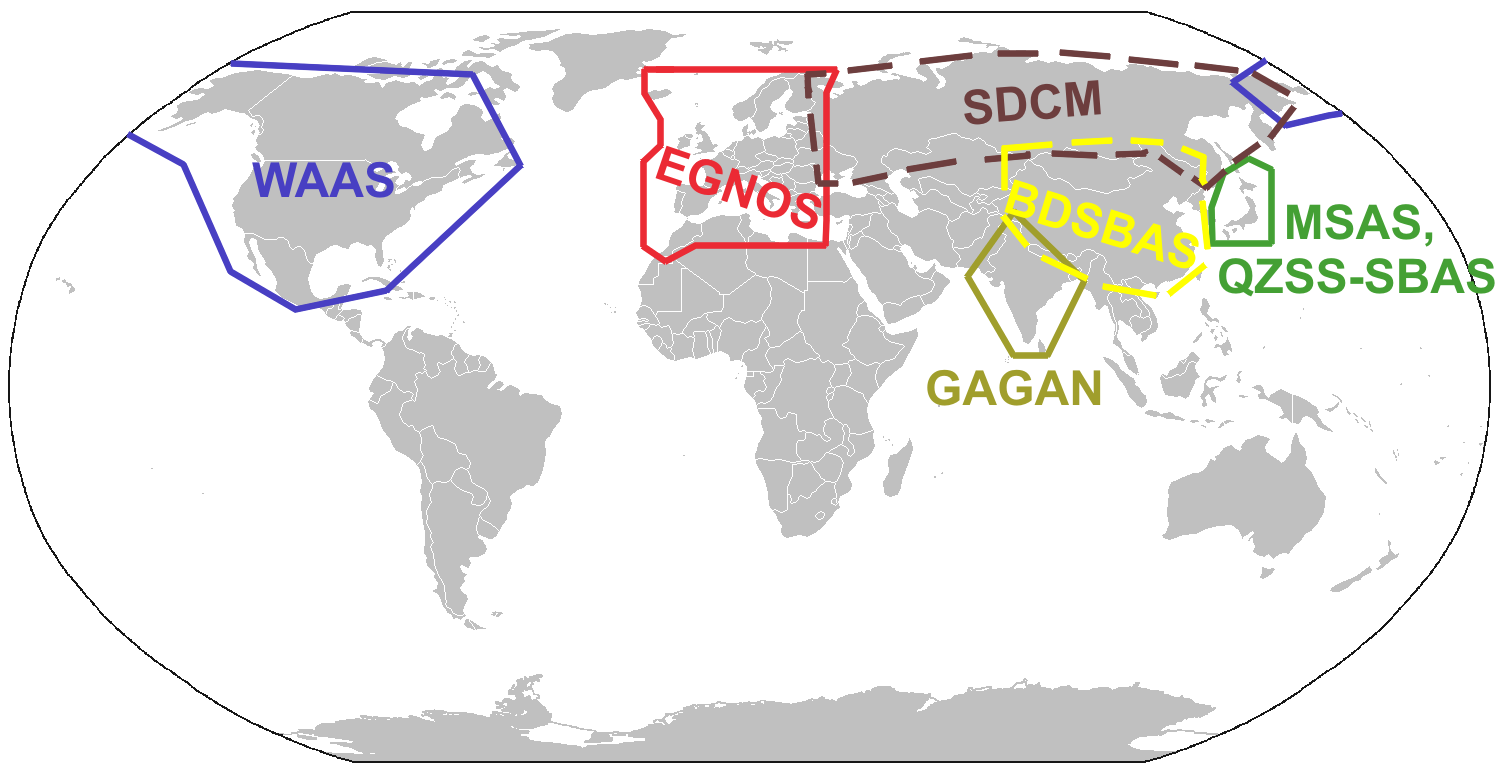
In the US, the satellite based augmentation system (SBAS) is called wide area augmentation system (WAAS). In Europe they have European Global Navigation Overlay Service (EGNOS). Wikipedia GNSS augmentation page has a great map that outlines the various systems proposed for the rest of the world:

The WAAS system uses several ground based stations at known locations throughout North America. The calculated difference is then broadcast to a master station that calculates the Deviation Correction (DC). The DC message is sent to the WAAS satellite. The DC signals are broadcast from the satellite to the appropriately equipped GPS receivers. The WAAS receivers are the ones certified to TSO-C145/C146 standard.

WAAS signals should allow the GPS receiver to resolve the position of the receiver to within 25ft vertically and horizontally 95% of the time. Usually the resolution is closer to 2ft. This accuracy will allow the the receiver to be used for precision approaches similar to the traditional ILS system.

Ground Based

There are two major types of ground based augmentation systems in the US, DGPS and LAAS. DGPS is differential GPS. DGPS users are normally survey crews, and boats. On boats, DGPS navigation is provided by the Coast Guard. Local area augmentation system (LAAS) is the FAA's version. 

LAAS uses multiple (at least 4) receivers around an airport at known locations broadcasting correction signals in all directions. The LAAS correction signal will be broadcast on VHF navigation frequencies using a normal data link.

The advantage of LAAS over and ILS is that all the LAAS transmitters transmit on the same frequency. ILS will require a separate radio, antenna array and maintenance for each runway that the ILS is available for. The LAAS receiver
will calculate the approach path allowing for standard ILS like approaches. The accuracy should be better than WAAS since the difference is focused to a 30 mile diameter.

LAAS isn't not available at many airports today. The experimental LAAS installations have proven the system is quite useful. The system at Memphis has been proven safe since fall of 2006. The Memphis tests have been used for testing RNAV like approaches.

Approaches

GPS approaches are being added to many airport, almost daily. The typical GPS approach will not be as straight as and approach requiring VORs. Most aviation GPS receiver systems will be able to calculate the approach path waypoint to waypoint, where the waypoints are RNAV type locations.

Localizer Performance with Vertical guidance (LPV) is the highest precision approach level below RNP Special Aircraft and Aircrew Authorization Required (RNP SAAAR) approaches. LPV approaches are equivalent to ILS approaches. WAAS can provide adequate accuracy for LPV approaches. LAAS can also provide accuracy for LPV approaches. 

The FAA is able to survey and publish LPV approaches at airports and runways without adding any extra equipment. Many runways that are not suitable for ILS equipment have LPV approaches today, and more are being surveyed all the time. The LPV is typically depicted on the GPS approach chart.

LNAV is a non-precision approach that can be accomplished with almost any GPS. Augmentation is not required for the LNAV approach provided the receiver is able to maintain resolution to 1800ft (0.3nm).LNAV approaches, are similar to VOR approaches for the minimum descent altitude (MDA). The LNAV is also typically depicted on the GPS approach chart.


Next up, we will talk about ADS/B and RNP and how they help keep us out of each others way.

Tuesday, April 30, 2013

Next Gen

This is the first part of at least a 3 part post. I could write one giant novel of a post, but then I don't think as many people would read it, and this way I can break things into logical chunks, so people who understand one subject (IE WAAS) don't have to read that.

GNSS Basics

GNSS stands for Global Navigation Satellite Systems. That means there are signals coming from satellites that help you know where you are. In the USA there is the GPS system, Russia provides GLONASS, China is building Beidou and the EU is building Galileo. While they all generally do the same thing, they all do it slightly differently, and on a slightly different radio frequency. All the systems do is tell you what time the satellites think it is, very accurately.

I'll say GPS, when I mean any of the GNSS systems, just to make things consistent and short.

All the GPS systems do, is tell you where the satellites are at the moment they sent the time. Since all they do is tell you what time it was when the signal was transmitted. When the GPS receiver hears the message containing the time, and the location, it can calculate how far away the satellite was when the signal was transmitted. Knowing how far away the receiver is from 3 points will give a pretty good idea of where the receiver is. Knowing how far away from 4 or 5 satellites will give even more accuracy, indicating elevation, as well as position on the surface of the earth.

Since the receiver doesn't really know where it was when it was turned on, it needs a couple minutes to figure out all the possible positions it could be based on the number of receivers it can hear, and how far away from them it is.

Radio signals are pretty reliable, but sometimes they are interrupted, or bounce around. Ever have some ghosting images on a TV from signals being delayed to the TV receiver? The same thing can happen with GPS receivers. Various atmospheric conditions can delay or accelerate signals. Close to the ground in an urban setting can be the worst, since the signals will bounce off of buildings and vehicles making the receiver work extra hard to figure out where it is. If a signal just doesn't make any sense to the receiver, it can reject that signal.

The satellites are moving at around 17000mph, the earth is turning at about 650 mph and the receiver may also be moving. The earth is not round, it is egg shaped (average). The math gets quite complicated. There are some handy mostly simple formulas to get latitude/longitude math at http://williams.best.vwh.net/avform.htm. Add in some other math to calculate the movement, and now things get all kinds of fun.

Since everything is moving, sometimes several satellites will not be in optimum positions to let the receiver hear them. Some be very close together, straight up, or some may be close to the horizon. If they are all bunched up in the sky, their time will all be the same, and it will be hard to differentiate between the signals. Likewise when the satellites are close to the horizon, they will subject to more interference, either through buildings or mountains.

The GPS constellation has about 32 active satellites. That means 16 are on this side of the earth and 16 are on the other side. Actually it will be maybe 12, since probably 4 of the 16 are too low on the horizon just rising, or just setting. Sometimes too, the satellites are having maintenance done on them, with software upgrades, or other tests. Hearing 8 satellites in any day is a really good place to be.

Because of the dynamic nature of the satellite constellation and the earth, and the vehicle we may be in, sometimes we don't get a good signal. The quality of the signal can be predicted. The FAA provides a web site that will show the current and future signal quality for the USA. If you use java in the browser the tool is very dynamic: http://www.raimprediction.net/applet.php Looking at the top of the page, there are also summaries. When they show a red area, that means the accuracy quality worst case is not able to be met for that time period. The 3 levels they show are enroute = 2miles, terminall=1mile, NPA=0.3 miles.

GPS is giving the position of the receiver in 3 dimensions. GPS can calculate latitude, and longitude as well as altitude. If the latitude is off by 0.3 miles, that means the altitude is also off by around 0.3 miles, or 1500 feet. Vertical guidance by GPS seems a huge challenge. Many aircraft receivers have an option for barometric aiding. The altimeter in the aircraft works by measuring changes in barometric pressure. The same concept can be used with the GPS receiver. By feeding the receiver with a know barometric pressure, it can more accurately calculate altitude.

Various GPS receivers are available in the aviation market that are built to various standards. Most of the early GPS receivers installed in aircraft were certified to a TSO C-129 standard. Some aircraft may have TSO C-196 standard receivers as well. The C-129 and C-196 receivers are able to receive GPS signals and may be enhanced with some kind of barometric aiding. The more popular standard these days are the TSO C-145/146 standard receivers. The C-145/146 receivers are able to receive WAAS signals.

WAAS is a Satellite Based Augmenation System (SBAS). WAAS stands for Wide Area Augmentation System. WAAS is another satellite or constellation that broadcasts correction values to GPS receivers. The WAAS system has a few ground based systems at known locations measuring the difference from the GPS broadcast position and where the location really is. Receivers listening to the WAAS signal can adjust the calculated GPS position using the known difference to be more accurate.

Any aircraft flying relying completely on GPS navigation is required to make a pre-flight check. If the receiver is using the C-129 or C-196 standards, then a full RAIM prediction must be made. The above map at http://www.raimprediction.net is sufficient. For aircraft using the C-145/146 standard receivers, then a check for GPS NOTAMs is required.

GPS Receiver Systems

A typical aviation GPS receiver is really a system. The GPS receiver can only tell you where it is. Typically the GPS receivers are connected to computers that are watching where they have been, and projecting where they are going. There is a function that can be used to smooth out the path, and predict where everyone is going called a Kalman Filter. There is some mapping software that holds the location of most of the waypoints for the region. The computer is also connected to a display to the pilot can see where they are, and enter a flight plan.


Next time I will talk more about augmentation systems. The third part will be about RNP and ADS/B.

Thanks for reading, and I look forward to some feedback.